
A Yamaha outboard serial number, also called the Primary Identification Number or PID, is usually printed on the silver or white identification plate mounted to the port-side transom bracket. This plate also lists the model code, shaft length, and key production details used to confirm the engine model, year range, and compatible OEM parts.
Doing a proper Yamaha serial number lookup upfront saves you from expensive mistakes and simplifies almost every part of engine ownership. You’ll need the exact model code and PID before ordering parts, checking warranty status, verifying recalls, or matching your engine to the correct exploded parts diagrams. Horsepower alone is not enough, since shaft length, trim style, regional specifications, and mid-production updates can all affect fitment.
In simple terms, a Yamaha outboard serial number lookup means finding the ID plate on the transom bracket, copying the model code and PID/serial number, then using Yamaha owner resources or a reliable parts catalog to confirm the correct model family, year range, and replacement parts.
Where is the Yamaha outboard serial number?
Yamaha outboard serial numbers are usually found on the silver or white identification plate on the port-side transom mounting bracket. This is the left side of the bracket that bolts the engine to the boat, usually above the waterline. The plate includes the model code, shaft length, and 6–7 digit Primary Identification Number, which can be used to confirm the engine model, year range, and compatible parts.


Where is the Yamaha outboard model number?
For Yamaha outboards, the model number is usually located on the same port-side transom bracket ID plate as the serial number. The model code helps identify horsepower, shaft length, trim style, and engine configuration, making it the most reliable starting point for parts lookup.
What information is on the Yamaha ID plate?
The ID plate usually shows several key details you’ll need for identification, including the model code, PID/serial number, shaft length, and basic manufacturing information. Having all of these in front of you makes the lookup process much smoother.
- Model code: identifies the engine family, horsepower, shaft length, trim style, and configuration.
- PID/serial number: identifies the production sequence and helps confirm the correct model range.
- Shaft length letter: helps distinguish short, long, and extra-long shaft versions.
- Manufacture date or date code: may appear on many newer Yamaha outboards.
How do I look up a Yamaha outboard serial number?
- Find and record the PID/serial number and model code from the transom bracket ID plate.
- Use Yamaha’s official owner tools or a reliable parts and schematics catalog to identify the correct model family and production range.
- Match the model code, shaft length, and PID before ordering parts.
- If anything is unclear, contact Yamaha support or PartsVu support with a clear photo of the ID plate.
Open Yamaha Schematics • Find Parts by Model • Contact Support
Other helpful places to check
If access is tight, the plate is dirty, or the label is difficult to read, you may also find the information in:
- Original sales invoice
- Boat registration paperwork
- Warranty card
- Dealer service records
- Previous owner documentation
Some engines may also have secondary stickers or stamped identifiers in other places on the powerhead, but the transom bracket ID plate is still the best place to start.
Practical tips before you start
To avoid lookup errors later, clean the identification plate enough to clearly show the etched or printed characters. A flashlight can help reduce glare and make it easier to distinguish between tricky characters like the letter O and the number 0, or an I and a 1.
As you document the information, be careful not to confuse the model code with the PID/serial number. Take a clear, high-resolution photo of the entire plate before you call support or start an order. This gives you a reliable reference and prevents the frustration of having to re-check the motor mid-task.
How to Decode Your Yamaha Outboard by Serial Number
A Yamaha outboard engine number decoder uses the model code and serial number from the transom bracket ID plate to identify key details such as horsepower, shaft length, trim style, and model year range. For example, a model like F115TXR can indicate a 4-stroke 115 hp outboard with specific shaft and control features.
Model code vs PID/serial number
Model Code
The model code identifies the engine family, horsepower, shaft length, trim style, and configuration. This is usually the most useful starting point when matching your outboard to diagrams or parts listings.
PID/Serial Number
The PID, or Primary Identification Number, identifies the production sequence and manufacturing range. It helps verify that the parts you are viewing apply to your exact engine, not just a similar horsepower model.
What the plate tells you
Information on Plate |
What It Helps Identify |
| Model Code | Engine family, horsepower, and configuration |
| Shaft Length Letter | Short, long, or extra-long shaft |
| PID/Serial Number | Production range and parts reference |
| Market Code | US vs international specification |
| Manufacture Date or Date Code | Build timing on many newer models |
How to tell the year of a Yamaha outboard
To tell the year of a Yamaha outboard, check the identification plate on the transom mounting bracket. Older 1984–2004 models often use a letter at the end of the model code to indicate the year, while many 2005-newer engines show a manufacture date or date code on the identification label.
Common Yamaha outboard year codes on older models include:
Year Code |
Model Year |
| Y | 2000 |
| Z | 2001 |
| A | 2002 |
| B | 2003 |
| C | 2004 |
| D | 2005 |
Important note about model year
Mid-2000s and newer Yamaha outboards may not clearly list a traditional “model year” on the plate. In many cases, the model family stays consistent across multiple production years, while parts changes happen within the production cycle.
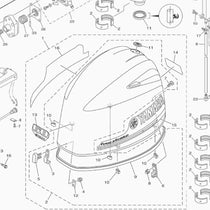
Instead of relying only on generic Yamaha outboard year charts, confirm your exact engine against the model code, PID, and exploded parts diagrams. Parts catalogs and schematics are the final authority when fitment matters.
Yamaha Outboard Serial Number Lookup Online (Step-by-Step)
This is the practical Yamaha outboard motor serial number lookup process.
Step 1: Gather Your Information
Snap a photo of the ID plate and jot down the model code and PID exactly as shown. Include any shaft length, trim, market, or date code information visible on the label.
Step 2: Open Owner or Parts Resources
Use Yamaha’s official owner resources or a trusted parts catalog. You can also open PartsVu’s schematics to match your model family and confirm the parts that fit your engine.
Select:
- Brand
- Horsepower
- Model family
Or enter the full model code directly if the catalog allows it.
Step 3: Match Model Code and Production Range
Confirm the following details before moving forward:
- Shaft length
- Gear ratio
- Year range
- Production series
Make sure your PID falls within the specified production range for that model.
Step 4: Save Your Exact Schematics Page
Once confirmed:
- Bookmark your exploded diagrams
- Use them for filters, spark plugs, anodes, and impellers
- Reference them for torque specs and service procedures
Mini Flow Diagram:
Find Plate → Record Model + PID → Open Schematics → Match Production Range → Save Schematics Page → Order Parts
Common Pitfalls During a Yamaha Serial Number Lookup
One of the most common mistakes during a Yamaha outboard serial number lookup is confusing the model code with the PID/serial number. They are not interchangeable, and each serves a different purpose when identifying parts and production details. Another frequent issue is transposing characters, especially mixing up O and 0, or 1 and I, which can lead to incorrect search results or mismatched parts.
Owners also sometimes ignore the shaft length letter, but even a single letter difference can change parts compatibility. Using the wrong market code can create problems as well, since US and international engines may have specification differences. Finally, assuming that horsepower alone is enough to identify an engine is a mistake. It is not sufficient for accurate parts lookup or service confirmation.
If the Plate Is Missing or Illegible
If your ID plate is damaged:
- Check dealer invoice
- Contact the previous owner
- Look for casting stickers
- Take clear engine photos
- Contact Support with images
A dealer can often confirm details using alternative identifiers.

Quick Wins Once You Identify the Model
Once your engine is confirmed, you can confidently order:
- Oil change kits
- Gear lube kits
- Water pump/impeller kits
- Spark plugs
- Anodes
- Thermostats
Starter Service List:
- Oil and Filter Kit
- Gear Lube Kit
- Spark Plugs
- Water Pump Kit
- Anode Set
Related Yamaha Identification Questions
Where is the Yamaha outboard engine number?
A Yamaha outboard engine number is found on the identification plate mounted to the port-side transom bracket. This plate lists the model code and serial number, which can be used to verify the engine configuration, production details, and correct OEM parts.
Where is a Yamaha WaveRunner serial number?
A Yamaha WaveRunner serial number is usually the Hull Identification Number, or HIN, located on the rear transom, often on the upper right side. The 12-character code typically begins with “YAM” and includes the model year in the final characters.
Where is the Yamaha outboard key number?
A Yamaha outboard key number is usually a 3-digit code stamped on the original key or on the ignition switch barrel. If the key is missing, the ignition switch may need to be removed so the stamped code can be read and used to order a matching replacement key.
Troubleshooting FAQ
My plate is gone – what now?
Start with any paperwork you have, such as the original dealer invoice, warranty card, or boat registration documents. If that doesn’t help, take clear photos of the engine and reach out to support for assistance.
Model year vs build year vs registration year – what’s the difference?
Model year may differ from production year. Build year refers to when the engine was manufactured. Registration year reflects when the boat was registered, not when the engine was built.
Why do online charts conflict on year?
Regional codes, model code changes, and mid-year production updates can create mismatches. Always confirm using the model code, PID, and exploded parts diagrams.
Can I order parts with only horsepower?
Not reliably. Horsepower alone does not confirm shaft length, trim style, production range, or regional specification. Always confirm the model and PID first.
Conclusion and Next Steps
A correct Yamaha boat motor serial number lookup follows a simple path:
Photo the ID plate → Record the Model and PID → Decode using schematics → Confirm production range and shaft length → Save your exact model page → Order parts with confidence.
Once you’ve saved your model page, use it as your home base for every service item — oil filters, gear lube, spark plugs, anodes, impellers, thermostats, and gaskets. This eliminates guesswork and prevents ordering the wrong parts due to mid-year changes or regional variations.
Always verify your information against the exploded parts diagrams and, when in doubt, confirm with Yamaha support before purchasing.
FAQ
Where is the Yamaha outboard serial number located?
On most models, the Yamaha outboard serial number is located on the silver or white ID plate on the port-side transom mounting bracket. The plate lists the model code, shaft length, and PID/serial number.
Where is the Yamaha outboard model number located?
The Yamaha outboard model number is usually found on the same port-side transom bracket ID plate as the serial number. The model code helps identify horsepower, shaft length, trim style, and engine configuration.
How do I check a Yamaha outboard by serial number?
Record the model code and PID/serial number from the ID plate, then use Yamaha owner resources or a trusted parts catalog to match the correct model family, production range, and parts diagrams. If unsure, contact support with a clear photo of the plate.
Can I get the year from a Yamaha outboard serial number?
You can often determine the model family and production range from the ID plate. Older Yamaha outboards may use a year code letter at the end of the model code, while many newer engines show a manufacture date or date code on the label.
What are Yamaha outboard year codes?
Yamaha outboard year codes are usually shown as a single letter at the end of the model code on older engines. Common late older-style codes include Y=2000, Z=2001, A=2002, B=2003, C=2004, and D=2005.
What if my plate is missing or unreadable?
Check dealer paperwork, warranty cards, registration documents, previous owner records, or secondary labels on the engine. If those do not help, contact support with clear photos of the engine and any visible markings.
Why do parts sites disagree on my engine year?
Regional codes, production updates, and mid-year changes can cause mismatches. Use the model code and PID, then verify fitment against exploded parts diagrams before ordering.
Can I order Yamaha outboard parts with only horsepower?
Not reliably. Horsepower alone does not confirm shaft length, trim style, production range, or regional specification. Always confirm the model code and PID before ordering parts.
Where is a Yamaha WaveRunner serial number located?
A Yamaha WaveRunner serial number is usually the Hull Identification Number, or HIN, located on the rear transom, often on the upper right side. The 12-character code typically begins with “YAM.”
Where is the Yamaha outboard key number?
The Yamaha outboard key number is usually a 3-digit code stamped on the original key or on the ignition switch barrel. If the key is missing, the ignition switch may need to be removed so the code can be read.
Always verify final identification against your owner’s manual, Yamaha support, or exploded parts diagrams before ordering parts or scheduling service.